
The ADN2814 is a continuous rate 10 Mb/s to 675 Mb/s clock and data recovery IC with integrated limiting amp
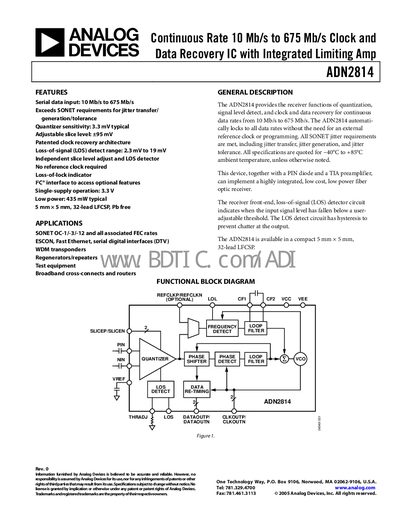
The ADN2814 is a continuous‑rate data recovery IC that provides quantization, loss‑of‑signal detection, and clock‑and‑data recovery for serial data rates from 10 Mb/s to 675 Mb/s. It operates from a single 3.3 V supply, requires no external reference clock, and includes a PC interface for optional features.\n\nTypical applications include SONET OC‑1/‑3/‑12, ESCON, Fast Ethernet, WDM transponders, regenerators, test equipment, and broadband routers. The device is offered in a compact 5 mm × 5 mm 32‑lead LFCSP package and meets SONET jitter requirements across temperature ranges of –40 °C to +85 °C.
| Serial data input rate | 10 Mb/s to 675 Mb/s |
|---|---|
| Power supply voltage | 3.0 V to 3.6 V |
| Power supply current (locked to 622.08 Mb/s) | 132 mA to 145 mA |
| Operating temperature range | –40 °C to +85 °C |
| Input voltage range (PIN/NIN) | 1.8 V to 2.8 V |
| Loss‑of‑Signal detect range | 2.3 mV to 19 mV |
The device supports continuous data rates from 10 Mb/s up to 675 Mb/s.
No, the ADN2814 automatically locks to the data rate without an external reference clock.
The IC operates from a single supply voltage between 3.0 V and 3.6 V.