
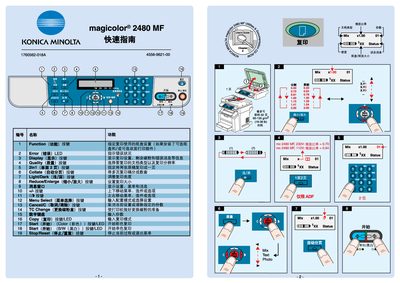
Konica Minolta magicolor 2480MF Quick Start Guide


Konica Minolta magicolor 2480MF Quick Start Guide - cover page
Brand
Konica Minolta
Category
Printer
Document type
Quick Start Guide
Language
Japanese
Pages
3
File format
PDF
File size
3.3 MB
Published
16 March, 2012
Updated
30 March, 2012
MD5 checksum
45408CF83FA69D16569BBA4D749B5B66

About this manual

This quick guide introduces the main functions of the Konica Minolta magicolor 2480MF printer, including menu selections for copy, start/stop, color and B/W modes, collate, and image enlargement. It explains the display indicators such as the Error LED and quality settings to help users monitor printer status.

The manual also provides instructions for replacing consumables like toner drums and outlines how to install the TWAIN driver for scanning applications. Safety cautions and end‑of‑life information are included to ensure proper maintenance. This manual is written in Japanese.

What's inside

  • Menu Select
  • Copy Function
  • Start / Stop
  • Color / B&W Mode
  • Error LED Indicator
  • Display Information
  • Quality Settings
  • Collate and 2‑In‑1 Printing
  • TWAIN Driver Installation
  • Consumable Replacement

Specifications

Print density ratio (110V)0.64

Frequently asked questions

What does the Error LED indicate?

The Error LED lights up to signal a problem, and the display will show the specific error condition.

Download PDF (3.3 MB)

More Konica Minolta Manuals


View all Konica Minolta manuals →