
This instruction manual is for the installation of Philips FCS145/MCS145 series luminaires, including product model, product features, product installation methods, installation precautions and other information.
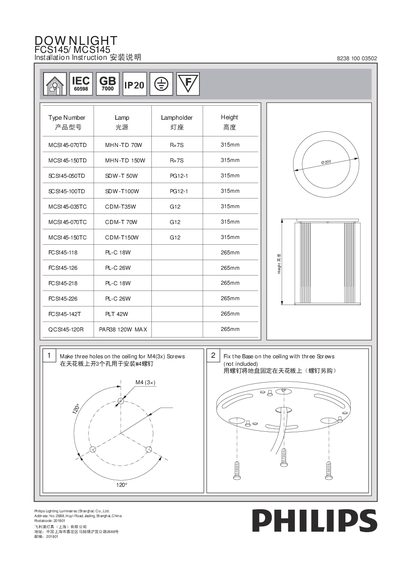
The guide explains how to mount the FCS145/MCS145 luminaire on a ceiling using three M4 screws, secure the base, and attach the power cord with wire clips. It also details opening the cover plate, positioning the luminaire, and tightening the screws to fix it in place.
Additional instructions cover connecting the power cord (0.75‑1.0 mm²), installing the lamp, and safely disconnecting the unit before lamp replacement. The document lists compatible lamp types and their specifications.
| MCS145-070TD lamp | 70 W, 315 mm height |
|---|---|
| MCS145-150TD lamp | 150 W, 315 mm height |
| SCS145-050TD lamp | 50 W, 315 mm height |
Three M4 screws are used to fix the base to the ceiling.
The unit must be disconnected before replacing the lamp.
Open the cover plate with a screwdriver, then install it and secure with the screw.