
Instructions for installing TMS122 luminaires
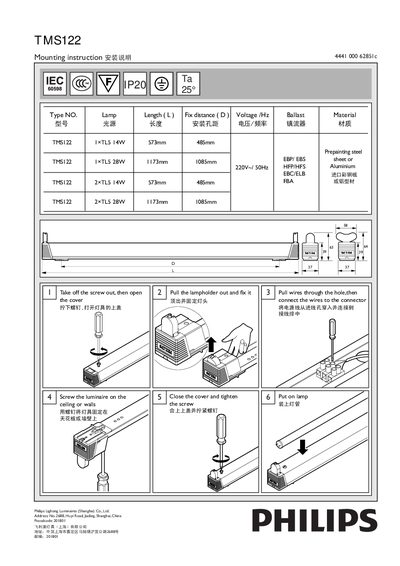
The Philips TMS122 mounting instruction provides step‑by‑step guidance for installing the luminaire on ceilings or walls. It includes details on fixing distances, required tools, and the type of ballast and lamp to use.
Key procedures cover removing the cover, pulling out the lampholder, securing the fixture, routing the power cable through the entry hole, connecting the wires to the connector, and finally inserting the lamp tube. Safety notes such as tightening screws and ensuring proper voltage are also included. This manual is written in Chinese.
| Length (model 1) | 573 mm |
|---|---|
| Length (model 2) | 1173 mm |
| Fix distance (alternative) | 1085 mm |
| Voltage / Frequency | 220 V / 50 Hz |
| Ballast types | EBP/EBS, HFP/HFS, EBC/ELB, FBA |
| Lamp | 1×TL5 14W or 1×TL5 28W |
Remove the cover, pull out the lampholder, screw the luminaire to the ceiling or wall, then close the cover and tighten the screw.
Pull the power wires through the entry hole and connect them to the connector inside the fixture.
The fixture supports TL5 lamps of 14 W or 28 W.