
Instruction manual, introduces the basic functions and operation methods of the watch, including time and date setting, summer time setting, 12/24 hour system switching, world time mode, stopwatch mode, alarm mode, countdown timer mode, etc.
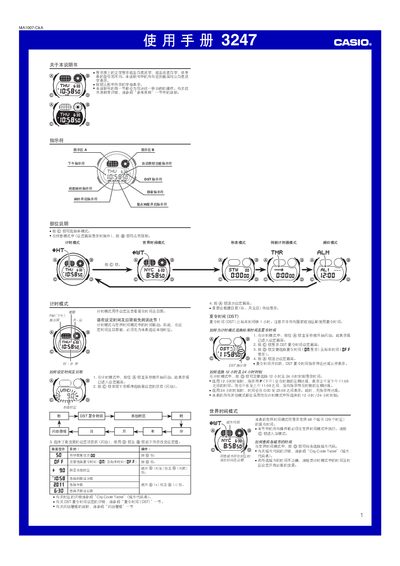
This manual provides step‑by‑step instructions for operating the Casio 3247 watch, covering basic time setting, world‑time configuration, daylight‑saving adjustments, and switching between 12‑hour and 24‑hour displays. It also describes how to use the stopwatch, countdown timer, and three multifunction alarms.
Additional sections explain the automatic illumination feature, battery replacement, technical specifications, and a city‑code table for world‑time mode. Safety notes and troubleshooting tips are included at the end of the document. This manual is written in Chinese.
| Accuracy | ±15 seconds per month |
|---|---|
| Time Display | hour, minute, second, PM indicator, month, day, weekday |
| Time Format | 12‑hour / 24‑hour selectable |
| Year Range | 2000‑2099 (auto‑adjusting) |
| Time Zones | Up to 29 zones, selectable |
| Daylight Saving / Standard Time | DST toggle available |
| World Time Cities | 48 cities (29 zones) |
| Alarms | 3 multifunction alarms (2 single, 1 interval) |
| Stopwatch Resolution | 1/100 second |
| Stopwatch Maximum | 23:59:59.99 |
| Illumination | EL panel, selectable 3 s or 15 s, automatic mode |
| Battery | 1 CR2025, approx 7 years |
Press the @ button to toggle the time format between 12‑hour and 24‑hour modes.
In the time‑setting screen, press and hold the @ button for about 1 second to switch between DST and standard time.
Turn on the automatic illumination setting; then the watch will light the EL panel automatically when you rotate your wrist.
The watch has three multifunction alarms: two single‑time alarms and one interval alarm.