
Key facts
- Brand
- Leica
- Model
- TPS1200
- Category
- Surveying Equipment
- Industry
- Industrial
- Documents
- 13
- Languages
- EN · ZH
- Last added
- 2026-11-03
Start here
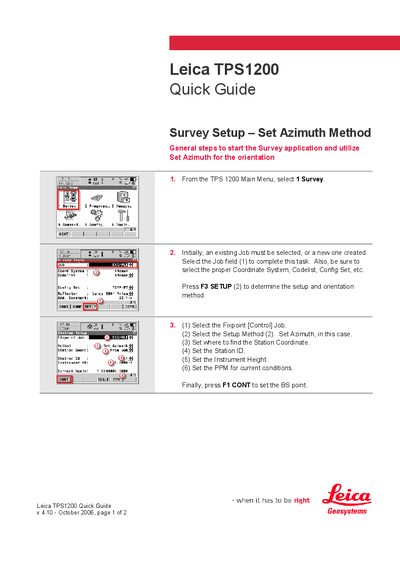
Leica TPS1200 Quick Guide
The Quick Guide walks the user through the Survey Setup – Set Azimuth method. It starts with selecting Survey from the main menu, choosing or creating a Job, and configuring the coordinate system, code list, and other settings.
The guide then details the steps to set the azimuth, station ID, instrument height, and PPM, followed by selecting the BS point, reflector height, and confirming the setup. After completing these steps the user is ready to begin surveying.
Leica TPS1200 specifications
| Accuracy | millimetre‑level |
|---|---|
| Starting distance from baseline | 2 m |
| Projection height interval | 0.1 m |
| Compatible instruments | TCRM1200, TCRA1200, TPRP1200 series |
All Leica TPS1200 documents by type
Day-to-day operation, settings and troubleshooting. Start here if the product is already set up.
- Leica TPS1200+ User Manual 192 p
- Leica TPS1200 Liscad GSI Guide 10 p
- Leica TPS1200 Measure System Manual 2 p
- Leica TPS1200 Measure System Manual 2 p
- Leica TPS1200+ Series Total Station Reference Manual 12 p
- Leica TPS1200 Total Station User Manual 12 p
- Leica TPS1200+ Total Station User Manual 12 p
- Leica TPS1200 Total Station User Manual 12 p
- Leica TPS1200+ Total Station User Manual 12 p
- Leica Geosystems TPS1200 Total Station User Manual 198 p
Disassembly, diagnostics and part numbers, for repair.
The shortest path to a working setup, usually only a few pages.
Questions answered in these manuals
What is the model number of the total station?
The model number is TPS1200+.
What is the standard battery for the TPS1200+?
The standard battery is GEB221 Lithium-Ion battery, 7.4V/4.4Ah.
What files are required to export Liscad GSI data?
The TPS_LCAD_M.FRT or TPS_LCAD_F.FRT format file and a codelist similar to the given example in Appendix A.
Where can I download the required files?
The format file and sample codelist are available for download on the Advantage Support website (www.leicaadvantage.com).
How do you set the azimuth on the Leica TPS1200?
Press F3 SETUP, select the Setup Method, and choose Set Azimuth.
How do you complete the BS point setup on the Leica TPS1200?
Enter the BS point ID, reflector height, point at the BS point, set the azimuth, then press F1 SET.