
Key facts
Start here
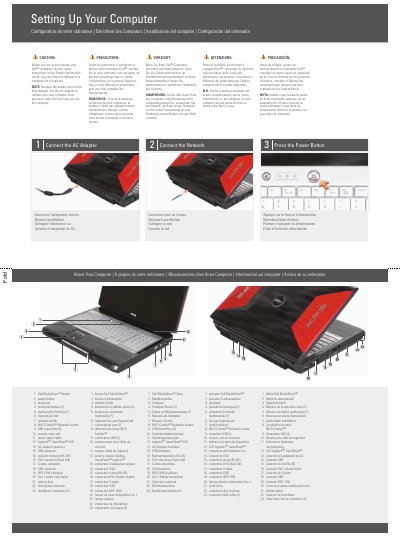
Dell XPS M1730 Setting Up Your Computer Quick Start Guide
This document provides setup instructions for the Dell XPS M1730, including connecting the AC adapter, connecting to the network, and pressing the power button. It also identifies the computer's features and ports, including USB, network, DVI-I, S-Video, IEEE 1394, and audio connectors.
The guide points users to the Owner's Manual for a complete list of features and additional operating information, and includes a diagram of the components needed for an optional wireless network setup.
Dell XPS M1730 specifications
| USB connectors | 2 on the right side, plus 2 additional USB connectors |
|---|---|
| Network connector | RJ-45 |
| Video connector | DVI-I (Dual link) |
| Additional video connector | S-video |
| IEEE connector | IEEE 1394 |
| Media card reader | 8-in-1 |
| Headphone connectors | 2 |
| Document part number | 0PY771A01 |
Source: Dell XPS M1730 Setting Up Your Computer Quick Start Guide
All Dell XPS M1730 documents by type
The shortest path to a working setup, usually only a few pages.
Day-to-day operation, settings and troubleshooting. Start here if the product is already set up.
- Dell XPS M1730 Notebook Owner's Manual 216 p
- Dell XPS M1730 Notebook Owner's Manual 216 p
- Dell XPS M1730 Notebook Owner's Manual 208 p
- Dell XPS M1730 Notebook Owner's Manual 220 p
- Dell XPS M1730 Setup and Operation Guide 2 p
- Dell XPS M1730 Computer Setup Guide 2 p
- Dell XPS M1730 User's Manual 192 p
- Dell XPS M1730 User Manual 192 p
Disassembly, diagnostics and part numbers, for repair.
Questions answered in these manuals
How do I set up the Dell XPS M1730 for first use?
Connect the AC adapter to an electrical outlet, connect the network, and then press the power button. Use the AC adapter for the first use because the battery may not be fully charged.
From: Dell XPS M1730 Setting Up Your Computer Quick Start Guide
Where can I find more information about using the computer?
See the Owner's Manual for more information about using the computer. If a printed copy is not available, use the Documentation and Support icon on the desktop or go to support.dell.com.
From: Dell XPS M1730 Setting Up Your Computer Quick Start Guide
What is the model number of this Dell XPS M1730 notebook?
The model number is PP06XA.
What is the publication date of this manual?
The manual was published in April 2008.
What processor is used in the Dell XPS M1730?
The notebook uses an Intel Core 2 Duo processor or an Intel 45 nm Core 2 Duo processor.
What is the maximum RAM capacity supported?
The system supports up to 4 GB of memory using two 2 GB SODIMM DDR-II modules.