
Key facts
- Brand
- DELL
- Model
- W-6000
- Category
- Power Management
- Industry
- Computers
- Documents
- 7
- Languages
- ZH · EN · ES
- Last added
- 2026-11-10
Start here
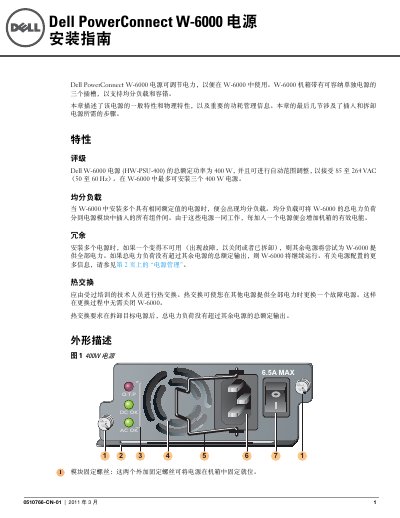
Dell PowerConnect W-6000 Power Supply Installation Guide
This guide describes the Dell PowerConnect W-6000 power supply. It states that the W-6000 chassis has three slots for power supplies and that up to three 400 W units can be installed.
It covers load sharing, redundancy, hot swap, LED indicators, power management, installation, removal, and safety information. The power supply is rated for 85 to 264 VAC input and uses a 10 A power cord with an IEC320 plug. This manual is written in Chinese.
Dell W-6000 specifications
| Total rated power | 400 W |
|---|---|
| Input voltage range | 85 to 264 VAC |
| Input frequency range | 50 to 60 Hz |
| Maximum power supplies | Three 400 W units |
| Power cord current rating | 10 A |
| Power cord plug | IEC320 |
Source: Dell PowerConnect W-6000 Power Supply Installation Guide
All Dell W-6000 documents by type
Mounting, wiring and first power-up. Read it before the hardware goes in.
- Dell PowerConnect W-6000 Power Supply Installation Guide 6 p
- Dell PowerConnect W-6000 Installation Guide 6 p
- Dell PowerConnect W-6000 Fan Tray Installation Guide 6 p
- Dell PowerConnect W-6000 Power Supply Installation Guide 8 p
- Dell PowerConnect W-6000 Fan Tray Installation Guide 6 p
- Dell PowerConnect W-6000 Power Supply Installation Guide 6 p
- Dell PowerConnect W-6000 Controller Installation Guide 394 p
Questions answered in these manuals
How many power supplies can the W-6000 chassis support?
The W-6000 can support up to three 400 W power supplies.
From: Dell PowerConnect W-6000 Power Supply Installation Guide
What AC input voltage range does the power supply accept?
It accepts 85 to 264 VAC.
From: Dell PowerConnect W-6000 Power Supply Installation Guide
What does the LED indicator status mean?
If the LED is off, the cooling module is not operating; if the LED is on, the module is operating normally; if the LED is amber, a fault has occurred and the module should be replaced.
Can the switch operate without a cooling module?
No, the switch will stop operating if a cooling module fails.
What is the normal operating temperature of the W-6000 chassis?
The normal chassis operating temperature is between 0 and 40 ºC. If this temperature is exceeded, the W-6000 activates a warning in the program.
How long does a hot-swap fan tray replacement take?
The replacement must be completed in less than one minute so that ventilation can resume correctly. If the tray cannot be replaced within that time, shut down the controller.