
Dell PowerConnect W-6000 power supply installation guide with 400 W rating, input voltage, LED states, load sharing, hot swap, and removal steps.
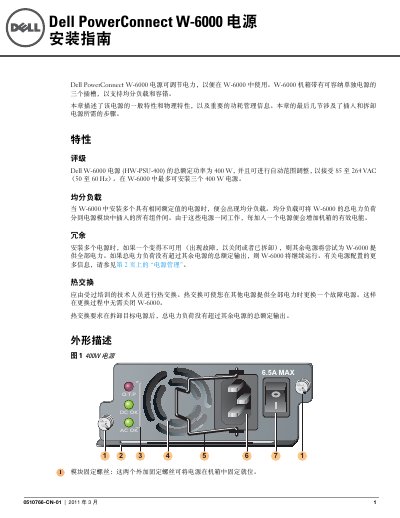
This guide describes the Dell PowerConnect W-6000 power supply. It states that the W-6000 chassis has three slots for power supplies and that up to three 400 W units can be installed.
It covers load sharing, redundancy, hot swap, LED indicators, power management, installation, removal, and safety information. The power supply is rated for 85 to 264 VAC input and uses a 10 A power cord with an IEC320 plug. This manual is written in Chinese.
| Total rated power | 400 W |
|---|---|
| Input voltage range | 85 to 264 VAC |
| Input frequency range | 50 to 60 Hz |
| Maximum power supplies | Three 400 W units |
| Power cord current rating | 10 A |
| Power cord plug | IEC320 |
The W-6000 can support up to three 400 W power supplies.
It accepts 85 to 264 VAC.
Yes, if the other power supplies provide full power during replacement.
The power cord must be rated for 10 A.