
Key facts
- Brand
- DELL
- Model
- OptiPlex 3030 All-in-One
- Category
- All-in-One Desktops
- Documents
- 4
- Languages
- ZH · EN · PT
- Last added
- 2026-10-17
Start here
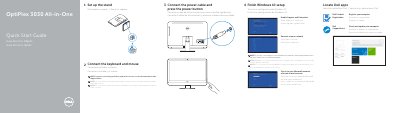
Dell OptiPlex 3030 All-in-One Quick Start Guide
This document serves as a Quick Start Guide for the Dell OptiPlex 3030 All-in-One computer. It provides multilingual instructions (English, Portuguese, Spanish) for setting up the stand, connecting the keyboard, mouse, and power cable, and completing the initial Windows 10 setup process. Users are advised to consult separate documentation for wireless peripherals and secured network connections.
Read onlineDell OptiPlex 3030 All-in-One specifications
| Memory Type | Unbuffered non-ECC, dual-channel DDR3 |
|---|---|
| Maximum Memory | 16 GB |
| Display Resolution | 1600 x 900 |
| Power Supply | 180 W |
| Network Adapter | Intel 10/100/1000 Mbps Ethernet LAN |
All Dell OptiPlex 3030 All-in-One documents by type
Disassembly, diagnostics and part numbers, for repair.
The shortest path to a working setup, usually only a few pages.
Day-to-day operation, settings and troubleshooting. Start here if the product is already set up.
Questions answered in these manuals
What tools are recommended for disassembly?
The manual recommends using a small flathead screwdriver, a Phillips screwdriver, and a small plastic pry tool.
What is the maximum memory capacity?
The maximum memory capacity for this system is 16 GB.
What tools are recommended for working inside the computer?
The recommended tools include a small flat-blade screwdriver, a Phillips screwdriver, and a small plastic scribe.
How do I ground myself before working inside the computer?
To avoid electrostatic discharge, ground yourself by using a wrist grounding strap or by periodically touching an unpainted metal surface, such as a connector on the back of the computer.
What should I do before working inside the computer?
Disconnect all power sources, shut down the computer, disconnect network cables, and ground yourself before touching internal parts.
What tools are recommended for internal procedures?
A small flathead screwdriver, a Phillips screwdriver, and a plastic pointed instrument.