
Key facts
- Brand
- DELL
- Model
- One 2330
- Category
- All-in-One Desktops
- Documents
- 7
- Languages
- EN · ES · PT
- Last added
- 2023-11-20
Start here
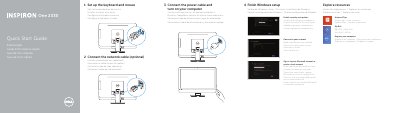
Dell One 2330 Quick Start Guide
This document serves as a multilingual quick start guide for the Dell One 2330 computer. It provides instructions for setting up the keyboard and mouse, connecting power and network cables, and completing the Windows setup process. The guide also explains how to enable security features and access the Microsoft account.
Read onlineDell One 2330 specifications
| Product Name | One 2330 |
|---|---|
| Power Voltage | 100 V CA–240 V CA |
| Power Frequency | 50 Hz–60 Hz |
| Input Current Consumption | 2,90 A |
Source: Dell One 2330 Quick Start Guide
All Dell One 2330 documents by type
The shortest path to a working setup, usually only a few pages.
Disassembly, diagnostics and part numbers, for repair.
Questions answered in these manuals
Where can I find product support and manuals?
You can find support and manuals at dell.com/support or dell.com/support/manuals.
What voltage range is required for the power supply?
The computer requires a voltage of 100 V CA–240 V CA.
How do I connect the power cable?
Connect the power cable and turn on your computer.
How do I complete the Windows setup?
Finish Windows setup by following the on-screen instructions.
Where can I find more information about the computer's features and advanced options?
Click Start, then All Programs, then Dell Help Documentation, or go to support.dell.com/manuals.
How do I contact Dell for sales, technical support, or customer service?
Go to dell.com/ContactDell; customers in the United States can call 800-WWW-DELL (800-999-3355).