
Key facts
Start here
Dell Dimension 4600C User Manual
This document is the user manual for the Dell Dimension 4600C desktop computer. It covers safety guidelines, initial setup, and connecting peripherals such as printers and network adapters. The guide also explains how to transfer information to a new computer and configure home or office networks.
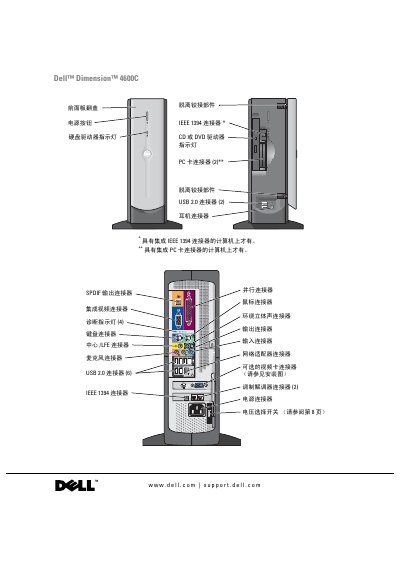
The manual includes a comprehensive troubleshooting section for hardware and software issues, including driver management and system restoration. It provides detailed instructions for adding internal components like memory, video cards, and PC cards, along with diagrams of the computer's front and rear views. This manual is written in Chinese.
Dell™ Dimension™ 4600C specifications
| Microprocessor | Intel® Pentium® 4 |
|---|---|
| L1 Cache | 8 KB |
| L2 Cache | 256 KB, 512 KB or 1 MB |
| System Chipset | Intel 865G |
| System Clock | 400 MHz, 533 MHz or 800 MHz |
| BIOS Size | 4 Mb (512 KB) |
Source: Dell Dimension 4600C User Manual
All Dell™ Dimension™ 4600C documents by type
Day-to-day operation, settings and troubleshooting. Start here if the product is already set up.
Questions answered in these manuals
What should the voltage selection switch be set to in Japan?
Set it to the 115 V position, even though Japan's AC voltage is 100 V.
How long should I wait after shutting down before disconnecting devices?
Wait 5 seconds after shutting down the computer.
How do I set the voltage selector switch for my region?
Set the voltage selector switch to the position that matches the local AC voltage; for example, in Japan set it to 115 V even though the mains is 100 V.
How can I add or replace a video card in the Dimension 4600C?
Refer to the "Add or replace video card" section, which explains how to remove the existing card and install a new one, including connector handling.