
Key facts
Start here
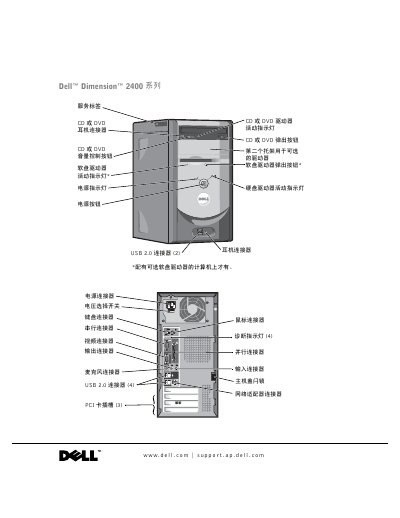
Dell Dimension 2400 Series Desktop User's Guide
This user guide covers the setup and use of the Dell Dimension 2400 desktop computer. It includes instructions for connecting peripherals such as printers, networks, and USB devices, as well as transferring information to a new computer. The guide also details how to configure the Home and Office Network and connect to the Internet. This manual is written in Chinese.
Read onlineDell Dimension 2400 specifications
| Processor | Intel Pentium 4 or Celeron |
|---|---|
| L1 Cache | 8 KB |
| L2 Cache | 256 or 512 KB |
| System Clock | 400 or 533 MHz |
| PCI Connectors | 3 |
| BIOS Chip | 4 Mb (512 KB) |
All Dell Dimension 2400 documents by type
Day-to-day operation, settings and troubleshooting. Start here if the product is already set up.
Questions answered in these manuals
What safety precautions should be taken when cleaning the computer?
Disconnect the computer from the power outlet before cleaning. Use a soft cloth dampened with water and avoid liquid or spray cleaners.
How should the voltage selection switch be set?
Set the switch to the position that matches the voltage of your local area's power supply.
How do I add a second CD or DVD drive?
See the "Adding a Second CD or DVD Drive" section on page 59 for step‑by‑step instructions.
What do the diagnostic lights indicate?
The diagnostic lights are explained in the "Diagnostic Lights" section on page 35.
How can I clear a forgotten BIOS password?
Use the password‑clearing procedure described in the manual’s “清除已忘记的密码” section.
How do I add a second CD or DVD drive?
Follow the instructions in the “添加第二个 CD 或 DVD 驱动器” section to install an additional optical drive.