
This document describes the features and characteristics of Dell™ Dimension™ 2400 Series computers, including CD/DVD drives, floppy drives, hard drives, USB interfaces, audio interfaces, etc.
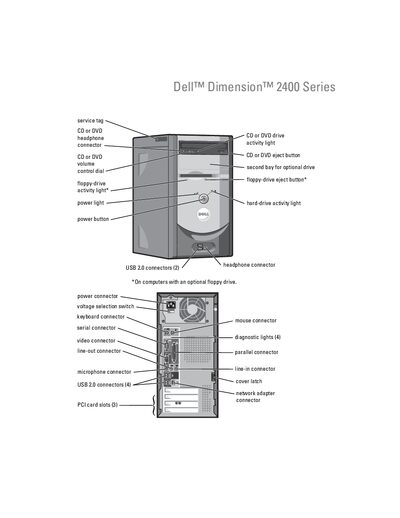
This manual covers the complete setup and use of the Dell Dimension 2400 desktop, including connecting peripherals such as CD/DVD drives, printers, keyboards, mice, and network adapters. It also explains how to configure the operating system, install drivers, and use Dell utilities like the diagnostics and PC Restore tools.
Additional sections address troubleshooting common hardware and software problems, detailed specifications of the system components, and step‑by‑step procedures for adding or replacing parts such as memory, drives, and cards. FCC notices and an index are provided at the end of the document.
| Microprocessor | Intel Pentium 4 or Celeron |
|---|---|
| L1 Cache | 8 KB |
| L2 Cache | 256 KB or 512 KB |
| System Chipset | Intel 845GV |
| PCI Bus Speed | 33 MHz |
| BIOS Chip | 4 Mb (512 KB) |
See the "Adding a Second CD or DVD Drive" section on page 59 for step‑by‑step instructions.
The diagnostic lights are explained in the "Diagnostic Lights" section on page 35.
Use the Dell PC Restore by Symantec procedure described on pages 41‑42.