
Dell Dimension 2400 Series Desktop User's Guide.
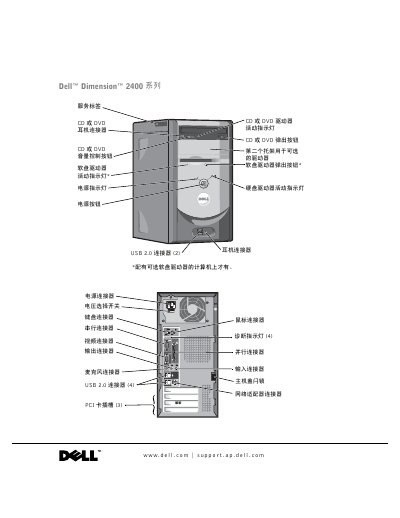
This user guide covers the setup and use of the Dell Dimension 2400 desktop computer. It includes instructions for connecting peripherals such as printers, networks, and USB devices, as well as transferring information to a new computer. The guide also details how to configure the Home and Office Network and connect to the Internet. This manual is written in Chinese.
| Processor | Intel Pentium 4 or Celeron |
|---|---|
| L1 Cache | 8 KB |
| L2 Cache | 256 or 512 KB |
| System Clock | 400 or 533 MHz |
| PCI Connectors | 3 |
| BIOS Chip | 4 Mb (512 KB) |
Disconnect the computer from the power outlet before cleaning. Use a soft cloth dampened with water and avoid liquid or spray cleaners.
Set the switch to the position that matches the voltage of your local area's power supply.
Unplug the power cord from the computer to prevent electric shock or damage to the system board.