
Setup guide for the Logitech G910 mechanical gaming keyboard, covering USB setup, G-keys, game mode, backlighting, and troubleshooting.
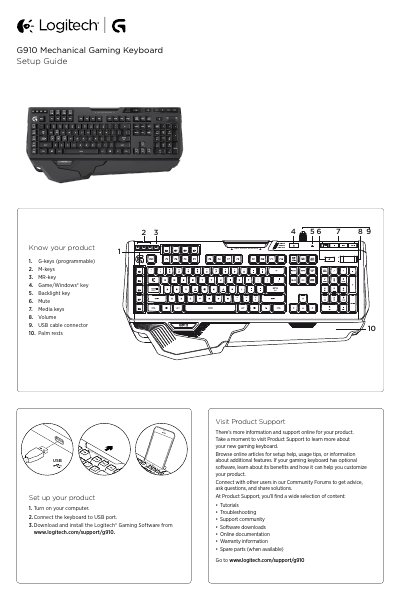
The Logitech G910 Mechanical Gaming Keyboard Setup Guide covers product identification, USB setup, programmable G-keys and M-keys, game mode, backlighting, and troubleshooting. It also points users to online product support, tutorials, software downloads, and community resources.
| Programmable G-keys | 9 |
|---|---|
| M-keys | 3 |
| Programmable functions per game | Up to 27 |
Turn on your computer, connect the keyboard to a USB port, then download and install the Logitech Gaming Software.
Press the MR key, press a G-key, type the keys to record, then press the MR key again.
It disables the standard Windows key and Menu key during game mode.
Use the backlighting button to turn backlighting on or off; use LGS software to control brightness and color.