
Installation guide for the Cypress CTM-ONE wireless gateway, covering mounting, antenna connections, and power options for vehicles.
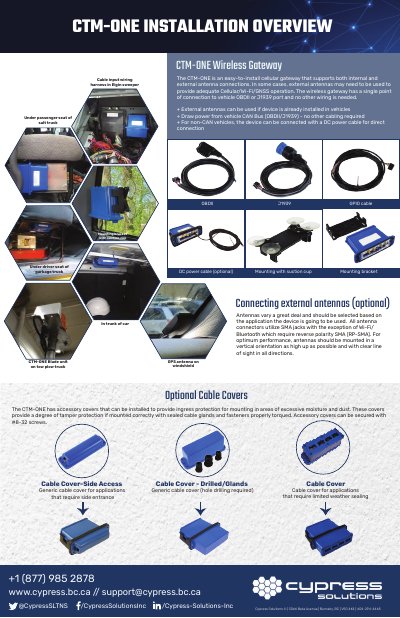
The CTM-ONE is a cellular gateway designed for easy installation in vehicles via OBDII or J1939 ports. It supports both internal and external antennas, with external options available for enhanced performance. Power can be drawn from the vehicle’s CAN bus or via a DC cable for non-CAN vehicles. Optional cable covers provide weather and tamper protection when properly installed.
Mounting options include suction cup brackets, cable harnesses, and GPS antenna mounts. Antennas should be mounted vertically with clear line of sight for optimal performance. All connectors use SMA jacks, except Wi-Fi/Bluetooth which use RP-SMA.
The CTM-ONE is an easy-to-install cellular gateway that supports both internal and external antenna connections.
The wireless gateway has a single point of connection to vehicle OBDII or J1939 port and no other wiring is needed.
Accessory covers can be secured with #8-32 screws.