
CT-800 is a device for measuring intraocular pressure, and it can be measured automatically or manually.
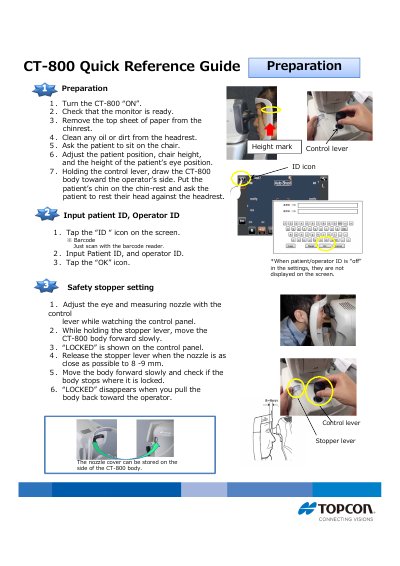
The CT-800 Quick Reference Guide is a short card-style guide that takes an operator through preparing and using the CT-800 eye pressure measuring instrument. It explains how to input the patient and operator ID on the ID screen or by scanning a barcode, how to set the safety stopper with the stopper lever until "LOCKED" appears and the nozzle is 8-9 mm from the eye, and how to turn the unit on, clean the chinrest and headrest, seat the patient and move the body with the control lever.
The measurement section describes the Auto and Manual air-puff modes, moving the alignment dot into the rectangle and waiting for the alignment bar to shorten, and the two measuring ranges ("1-30" and "1-60"). The results section lists the symbols shown with the latest 3 IOP values, covers adjustment of IOP for corneal thickness using a value measured by another device, and shows how measured data can be printed or transferred by touching the printer icon on the display.
| Measuring range modes | "1-30" and "1-60" |
|---|---|
| Nozzle-to-eye distance at lock | 8 - 9 mm |
| IOP values shown on screen | Latest 3 measurements |
In Auto mode the measurement is performed as soon as the alignment is OK; in Manual mode you must push the button on the control lever. Manual is used when the patient's eye is not stable.
Switch to the "1-60" measuring range mode when a measurement error occurs in the "1-30" mode.
A value only means the IOP was measured successfully, while brackets mean the reliability is low; ERROR and OVER indicate that no measurement was performed or that the IOP is outside the measuring range.
Measure IOP, tap the icons at the bottom of the display, then input the corneal thickness value measured by another device; the adjusted IOP is displayed and can be printed or sent out.