
This product is a waterproof network camera that supports PoE power supply and Micro SD card expansion storage.
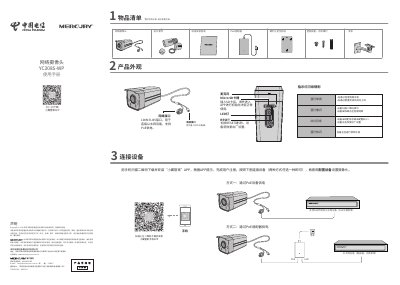
This is the Chinese user manual for the MERCURY YC308S-WP network camera, published by Shenzhen Mercury Communication Technology Co., Ltd. (mercurycom.com.cn). It opens with the package contents, a view of the camera parts (100M RJ45 network interface with PoE support, microphone, RESET button, Micro SD card slot, LED indicator) and the LED blinking rules.
The manual then shows two ways to power and connect the camera (a PoE switch or a PoE adapter with power supply), how to mount the bracket on the wall and fix the camera to it, and how to configure the device with the 小翼管家 (Xiao Yi Guan Jia) phone app by scanning the QR code. It ends with the warranty card terms and a declaration of hazardous substance content. This manual is written in Chinese.
| Network interface | 100M RJ45, supports PoE |
|---|---|
| Power port | DC12V |
| PoE specification (device label) | 53.5V 0.15A |
| Reset | Press and hold RESET for 5 seconds to restore factory settings |
| Storage | Micro SD card slot (card must be initialized in the app) |
Press and hold the RESET button for 5 seconds; the device will return to its factory settings.
Scan the QR code to download and install the 小翼管家 app, register an account and follow the app prompts to configure the camera.
It can be powered through a PoE device or a PoE adapter, or through the DC12V power port.
It has a 100M RJ45 network interface for connecting Ethernet devices, with PoE support.