
This quick start guide provides hardware connection, setup steps, indicator light explanations, and warranty information for the Mercury 7108502349…
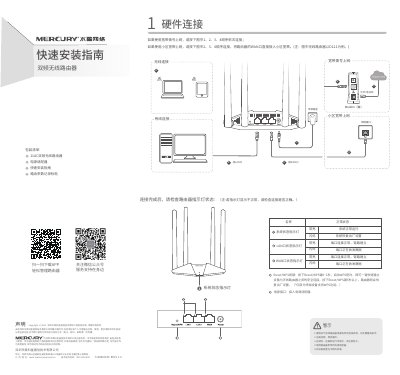
The guide explains how to connect the router for broadband dialing or fiber/telephone line, showing the order of connections for WAN, LAN, power, and modem. It also describes the meaning of the system status indicator lights for normal operation, factory reset, and data transmission.
It then walks the user through router configuration via the web interface (melogin.cn), including setting the admin password, choosing the internet connection type, and configuring the wireless SSID and password. Warranty details, safety warnings, and a FAQ section address common issues such as accessing the management page, resetting the device, and troubleshooting wireless connectivity. This manual is written in Chinese.
| Supported Wi‑Fi bands | 2.4 GHz and 5 GHz |
|---|
Ensure the computer is set to obtain IP address and DNS automatically, connect to the router's LAN port with the LAN indicator lit, and verify the network settings.
With the router powered on, press and hold the Reset/WPS button until the indicator flashes rapidly, then release.
Make sure the device's wireless function is enabled and can detect the signal, and verify that the SSID and password entered match exactly, including case.