
This guide provides hardware connection, setup steps, password creation, wireless configuration, and troubleshooting for the Mercury MW326R wireless router.
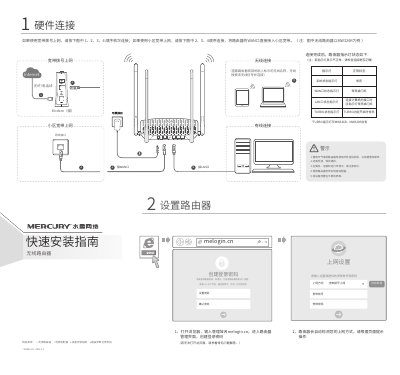
The guide explains how to connect the router hardware safely, including power, WAN/LAN ports, and environmental warnings such as avoiding lightning and heat sources. It also shows the indicator LED status after connection.
It then walks through creating a login password, configuring broadband or ISP settings, setting the wireless SSID and password, and includes a FAQ section for common issues like accessing the management page or resetting the device. This manual is written in Chinese.
| Turbo indicator | present |
|---|---|
| Wireless password length | 8-63 characters |
Power on the router, press and hold the RESET button on the back panel until all LEDs light up, then release.
Ensure the computer obtains an IP automatically, connect to the router's LAN port, check LED status, disable proxy settings, try a different browser or cable, and reset the router if needed.