
This document is the user manual of a router model. It introduces the router's functions and usage methods.
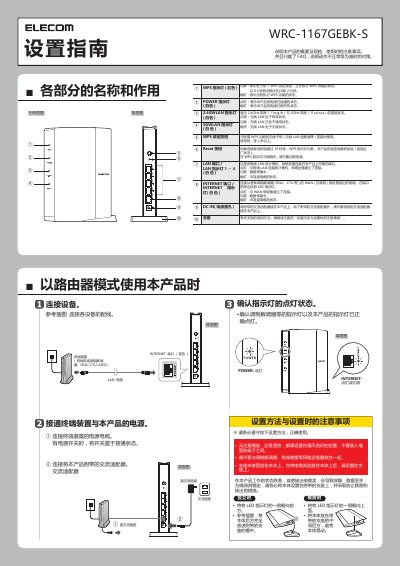
This document is the user manual for the ELECOM WRC-1167GEBK-S wireless router. It details how to physically install the device using the included stand, connect power and network cables, and verify the status of various LED indicators such as POWER, WPS, and LAN ports.
The guide also covers software configuration, explaining how to set up the router via a smartphone or tablet. It includes specific steps for connecting to the default SSID, entering authentication credentials, and switching the device into router mode. Additionally, it provides instructions for accessing the management interface via a web browser. This manual is written in Chinese.
| Management URL | http://192.168.2.1/wizard.html |
|---|
Press and hold the Reset button on the back of the unit for more than 10 seconds.
It indicates that the WPS function is being executed.
No, you must use the included AC adapter.