
Frsky R9 MM-FC Receiver User Manual, support Smart Port full duplex digital transmission interface, can be connected with XJT module, XSR, X6R and X8R receiver, new hub-less sensors, new Smart Dashboard and other user input/output devices without limitation on number or sequence at high speed.
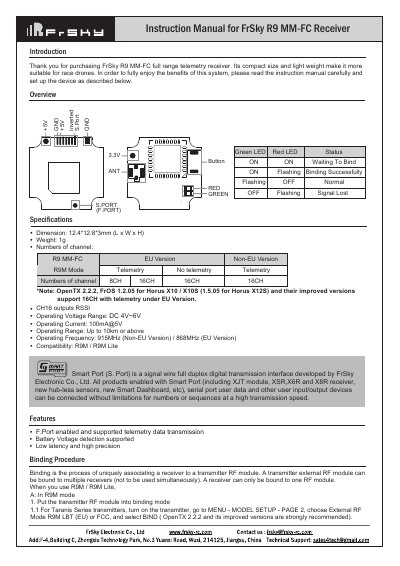
This document is the instruction manual for the FrSky R9 MM-FC full range telemetry receiver. It describes the Smart Port (S. Port) interface, which allows for high-speed digital transmission and connection of various user input/output devices without limitations on numbers or sequences. The receiver is designed for race drones due to its compact size and light weight.
| Weight | 1g |
|---|---|
| Operating Voltage Range | DC 4V~6V |
| Operating Current | 100mA@5V |
| Operating Range | Up to 10km or above |
| Operating Frequency (Non-EU) | 915MHz |
| Dimension | 12.4*12.8*3mm (L x W x H) |
There are three failsafe modes: No Pulse, Hold, and Custom.
For Taranis Series, go to MENU-MODEL SETUP-PAGE2, choose External RF MODE, select Bind, and choose telemetry. For Horus Series, go to RF SYSTEM, choose External RF, select R9M, then Bind and choose telemetry.
If failsafe is not set, the model will hold the last position after signal is lost, which may cause it to fly away or cause injury.