
The PI6C2501A is a high-performance, phase-locked-loop clock driver with zero-delay buffer that allows clock input to have spread spectrum modulation for EMI reduction. It features zero input-to-output delay and low jitter: cycle-to-cycle jitter ±75ps max. On-chip series damping resistor at clock output drivers for low noise and EMI reduction. It operates at 3.3V VCC and offers wide range of clock frequencies from 80 to 134 MHz. It is available in plastic 8-pin 150-mil SOIC (W) and plastic 8-pin 150-mil SOIC (WE) lead-free packages.
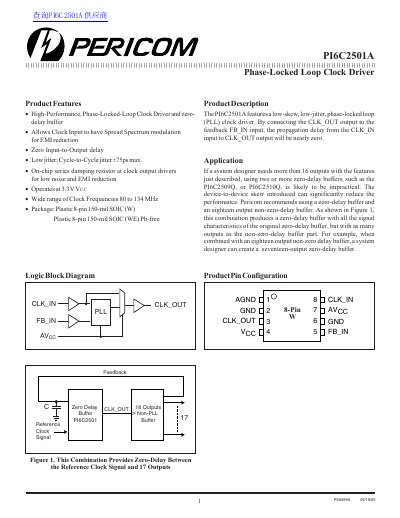
The Pericom PI6C2501A is a low-skew, low-jitter phase-locked loop (PLL) clock driver designed to provide nearly zero propagation delay from the CLK_IN input to the CLK_OUT output. It features an on-chip series damping resistor at the clock output drivers to reduce noise and EMI.
| Supply Voltage (Vcc) | 3.0 to 3.6 V |
|---|---|
| Clock Frequency Range | 80 to 134 MHz |
| Operating Temperature | 0 to 70 °C |
| Cycle-to-Cycle Jitter (Max) | +/- 75 ps |
| Package Type | Plastic 8-pin 150-mil SOIC (W) |
It is a phase-locked loop clock driver that allows the CLK_OUT output to be connected to the feedback FB_IN input, resulting in nearly zero propagation delay.
It includes an on-chip series damping resistor at the clock output drivers.
Yes, the CLK_IN pin allows for a spread spectrum clock input.