
EKB500 DVR and Telemetry Keyboard FW 1.5 introduce a new operating concept. The device comes with safety warnings, including avoiding placement near heaters, furnaces, other heat sources, or direct solar irradiation, operating only within the tolerable operating temperature range of 0°C~40°C, cleaning with a damp cloth while the device is unplugged, installing in dry and dustproof surroundings, protecting against liquid penetration, avoiding the penetration of any artifacts through ventilation slots, not opening the device yourself, and contacting a local installer or dealer in case of malfunction. Unauthorized opening of the device will void the warranty claim. The device should only be used for the purposes described in the manual and with the indicated power source in the technical data.
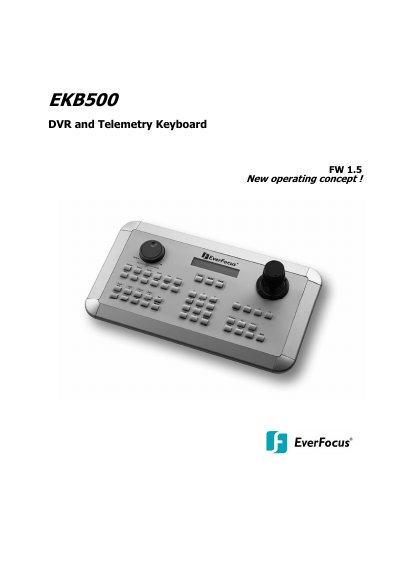
The EverFocus EKB500 is a universal keyboard designed for remote control of digital video recorders (DVRs) and telemetry control of speed dome cameras. Firmware version 1.5 introduces a new operating concept where main, call, and matrix monitors use the same input procedures, and cameras operate with a unified input method regardless of monitor type. The device features independent loop-through RS-485 ports supporting multiple protocols, including EverFocus, Samsung, Pelco-D/P, Panasonic, and LG.
The manual provides detailed instructions on installation, including RS-485 bus wiring and connection to various compatible devices like EverFocus EPTZ series, Samsung ED2200/2250, and Pelco-compatible PTZ devices. It also covers menu settings for COM ports, device configuration, and keyboard settings, as well as step-by-step operation guides for monitor selection, camera selection, and PTZ control.
| Keys | 48 |
|---|---|
| Joystick | 3-axis |
| Display | 2 lines with 20 characters each |
| RS-485 ports | 2 independent RS-485 ports with 2 RJ-45 sockets each |
| RS-232 | 1 x RS-232, Sub-D9 socket (service) |
| Power source | 12 VDC +-10%, via power supply |
| Power consumption | 10 W max. |
| Ambient temperature | 0°C ~ 40°C, non-condensing |
| Dimensions | 360 (W) x 110 (H) x 200 (D) mm |
| Weight | 1,5 Kg |
The keyboard supports EverFocus, ED2200/2250 (Samsung), Pelco-D, Pelco-P, Panasonic, and LG protocols.
The number of devices installed in one bus is limited to 32.
The maximum RS-485 bus cable length is 1200 m.
Yes, the 9-pin Sub-D connector is used for service purposes, such as keyboard update with new firmware.