
Agilent 8453E UV-Visible Spectrophotometer Installation Guide


Agilent 8453E UV-Visible Spectrophotometer Installation Guide - cover page
Brand
Agilent
Document type
Installation Guide
Language
English
Pages
1
File format
PDF
File size
67 KB
Published
08 June, 2012
Updated
29 September, 2023
Model
8453E
MD5 checksum
E98D37FBA0CA17D218460623B93A038B

About this manual

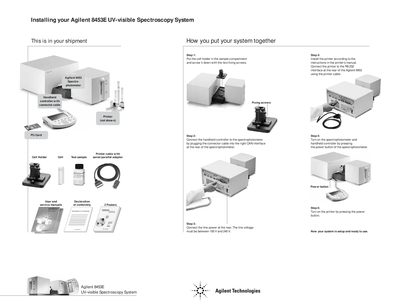
This document provides a step-by-step guide to installing the Agilent 8453E UV-visible Spectroscopy System. It details how to assemble the cell holder, connect the printer via RS-232 interface, link the handheld controller using the CAN interface, and set up power connections.

What's inside

  • Installing your system
  • Cell holder installation
  • Printer connection
  • Handheld controller connection
  • Power connection

Frequently asked questions

What line voltage range is required to connect the power?

The line voltage must be between 100 V and 240 V.

Download PDF (67 KB)

More Agilent Manuals


View all Agilent manuals →