
HS-60W operation guide, introduces the main features of HS-60W, including time display, stopwatch mode, split time, lap time and so on.
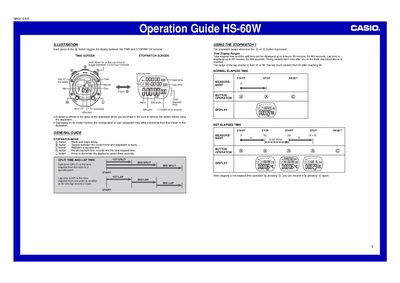
This document is an operation guide for the Casio HS-60W digital stopwatch. It explains how to toggle between the TIME and STOPWATCH screens using the button, including instructions for switching between 12-hour and 24-hour formats.
The guide details the functions of the stopwatch mode, such as starting/stopping timing, registering lap/split times, and recalling records. It also covers setting the time and date, recording finishing times for multiple runners, and care instructions regarding water resistance.
| Time Display Ranges (Total elapsed time) | 9 hours, 59 minutes, 59.999 seconds |
|---|---|
| Time Display Ranges (Lap time) | 59 minutes, 59.999 seconds |
| Lap counter range | 01 to 99 |
| Memory capacity for laps/splits | Up to 99 records |
| Year setting limit | 2099 |
| Water resistance rating | Five bars (atmospheres) |
Each press of the button toggles the display between the TIME and STOPWATCH screens.
Hold down the button for a few seconds to toggle between 12/24-hour formats.
Yes, press the button as each runner crosses the finish line to record their times in memory.