
This is an operation guide for the HS-30W 1 MA0510-EA stopwatch. It features time display, stopwatch display, split time, and lap counter functions.
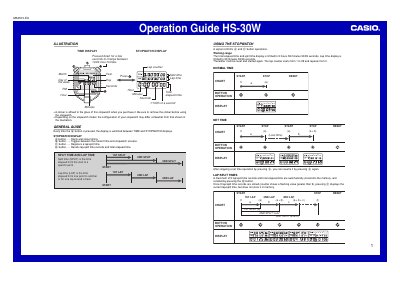
The Casio HS-30W is a digital stopwatch featuring both TIME and STOPWATCH displays. It allows users to switch between 12-hour and 24-hour formats by pressing the designated button for a few seconds. The device includes buttons to start/stop timing, toggle screens, register lap/split times, and recall records.
| Total elapsed time limit | 9 hours 59 minutes 59.99 seconds |
|---|---|
| Lap time limit | 59 minutes 59.99 seconds |
| Lap counter range | 1 to 99 |
| Memory capacity | 9 records |
Press down for a few seconds to change between 12/24-hour formats.
A maximum of 9 lap/split time records and total elapsed time are automatically stored into the memory.
Press the button for a few seconds in TIME display, then press other buttons to correct digits.