
This document is the installation guide for Linksys SPA962 IP Phone, which mainly introduces how to connect SPA962 IP Phone to the Internet
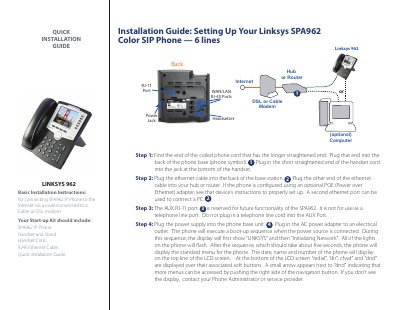
The guide walks you through the quick installation of the Linksys SPA962 IP phone. It starts with connecting the handset cord, then attaching the Ethernet cable to a router or hub, and explains the optional Power over Ethernet setup.
After powering the device, the phone runs a short boot‑up sequence (about five seconds) and displays the initial menu with status information. The AUX RJ‑11 port is noted as reserved for future use and should not be used for a telephone line. This manual is written in Chinese.
| Supported lines | 6 |
|---|---|
| Ports | RJ‑11 handset, RJ‑45 LAN, AUX RJ‑11 |
The AUX RJ‑11 port is reserved for future functionality and is not for use as a telephone line port.
The boot‑up sequence takes about five seconds before the standard menu appears.