
This document is the Linksys SPA 2102 ATA installation guide, which introduces the activation and installation methods of the device.
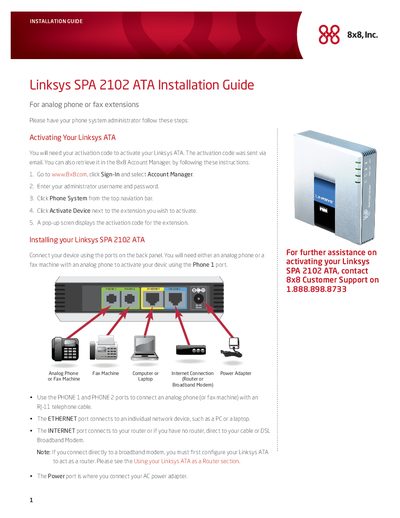
This guide explains how to activate the Linksys SPA2102 ATA using an activation code from the 8x8 Account Manager, and how to connect analog phones or fax machines to the PHONE ports. It also details the Ethernet, INTERNET, and Power connections required for operation.
The document provides step‑by‑step instructions for using the SPA2102 as a router when no separate router is present, including IP address discovery, web‑interface configuration, NAT/Bridge mode selection, and the meaning of the front‑panel indicator LEDs.
| Software version | 5.2.10 |
|---|---|
| Hardware version | 1.3.5(a) |
| WAN connection type | DHCP |
| Default LAN IP address (Bridge mode) | 192.168.0.1 |
Retrieve the activation code from the 8x8 Account Manager (or the email you received) and follow the on‑screen prompts after dialing **** on a connected phone.
Connect a broadband modem directly to the ATA, then access the web interface using the ATA’s IP address, enable NAT under the LAN Setup tab, and save the changes.