
This document describes how to configure Linksys RV082 VPN Router to implement Scenario 1 that the VPN Consortium specifies in “Documentation Profiles for IPSec Interoperability,” http://www.vpnc.org/InteropProfiles/Interop-01.html Scenario 1 is a gateway-to-gateway configuration with pre-shared secrets for authentication.
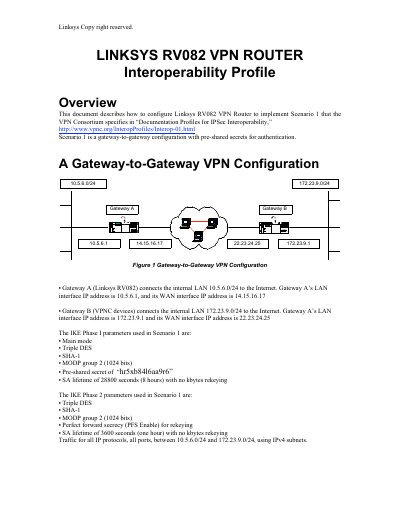
This manual explains how to configure the Linksys RV082 VPN router for gateway‑to‑gateway IPSec VPN scenarios. It covers initial access via the web UI, default login credentials, LAN and WAN network settings, and dual‑WAN/DMZ options.
The document also details IPSec tunnel creation, IKE proposal settings, encryption and authentication methods, keying modes, and tunnel testing. It includes example configurations and notes on supported features such as up to 1,000 tunnels, 3DES encryption, and Perfect Forward Secrecy.
| Default LAN IP address | 192.168.1.1 |
|---|---|
| Maximum supported tunnels | 1,000 |
| Supported encryption algorithms | DES, 3DES |
| Supported authentication algorithms | MD5, SHA-1 |
| IKE Phase 1 DH groups | Group 1 (768‑bit), Group 2 (1024‑bit), Group 5 (1536‑bit) |
The default LAN IP address is 192.168.1.1.
The router can support up to 1,000 VPN tunnels.
3DES is recommended because it is more secure and both sides must use the same method.