
Linksys PAP2-NA ATA Setup Guide

This document is a setup guide for the Linksys PAP2-NA ATA Analogy Telephone Adapter, which describes how to connect the product to the PlusNet's PlusTalk VoIP service.
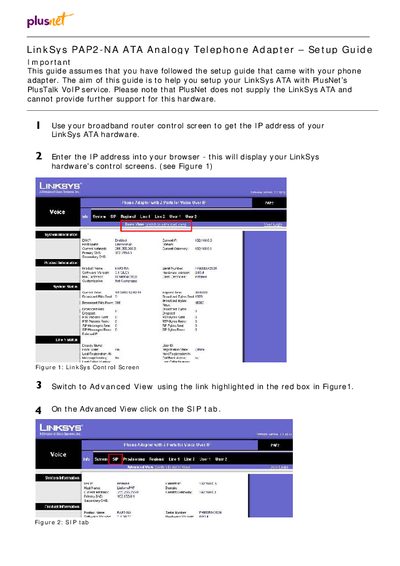

Linksys PAP2-NA ATA Setup Guide - cover page
Brand
Linksys
Category
Other
Document type
User Manual
Language
English
Pages
3
File format
PDF
File size
204 KB
Published
08 May, 2012
Updated
01 October, 2023
Model
PAP2-NA
MD5 checksum
A21917E4D23B4A25DA82C7569C833D56

About this manual

This guide walks you through setting up the Linksys PAP2‑NA analog telephone adapter for Voice‑over‑IP use with PlusNet. It assumes you have already completed the basic hardware installation and have a broadband connection.

The document covers accessing the ATA’s web interface, configuring STUN and NAT settings, setting proxy and subscriber information, saving the configuration, and resetting the device to factory defaults if needed.

What's inside

  • Setup Overview
  • Accessing the ATA Web Interface
  • STUN Server Configuration
  • NAT Settings
  • Proxy Server Configuration
  • Subscriber Information
  • Saving Settings
  • Factory Reset Procedure

Frequently asked questions

How do I configure the STUN server for the ATA?

Enable STUN and set the server address to stun.sipgate.net in the STUN settings page.

Download PDF (204 KB)

More Linksys Manuals


View all Linksys manuals →