
7600B2 is a new variable capacitance accelerometer with high sensitivity and frequency response, which can be used in various measurement occasions.
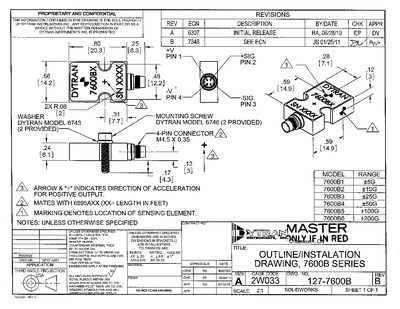
The document provides a detailed outline of the Dytran 7600B series accelerometers, including mechanical dimensions, mounting hardware, and wiring details. It lists the required washers (model 6743) and mounting screws (model 6746) and shows the connector type and thread specifications.
A performance specification table follows, giving input range, frequency response, sensitivity, non‑linearity, temperature limits, and other electrical characteristics for each model in the series (7600B1‑B6). The drawing is annotated with tolerances, machining notes, and reference to applicable standards.
| Weight | 0.4 oz (3.6 g) |
|---|---|
| Size (L × W × H) | 80 × 0.56 × 0.23 inches |
| Connector Type | 4‑PIN, M4.5 × 0.35 THD |
| Frequency Response | 0‑1500 Hz |
| Operating Temperature Range | -40 °F to +176 °F |
| Operating Current (Max) | 13 mA DC |
| Seal | Hermetic |
Two mounting screws (model # 6746) and two mounting washers (model # 6743) are supplied.
The device weighs 0.4 oz (3.6 grams).
The 7600B2 model accepts an input range of 0‑1000 g.
It operates from –40 °F up to +176 °F.