
This document is a user guide for Philips mobile phones. It describes the functions of the phone's keys, shortcut icons, stylus, and icons and symbols. It also provides instructions on how to use the phone and its basic functions, such as making calls, sending and receiving messages, and entering text.
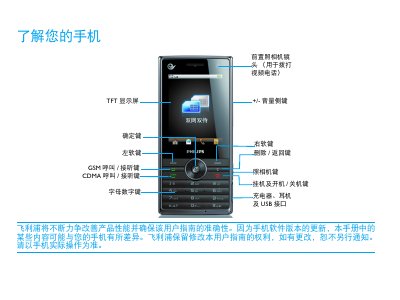
This manual introduces the Philips D612 mobile phone, explaining the main keys, icons, and how to operate basic functions such as calls, messaging, and camera use. It also provides step‑by‑step instructions for inserting the SIM/UIM card, charging the battery, and using the micro‑SD card for expanded storage.
Additional sections cover personalization settings, scenario modes, Bluetooth and USB connectivity, as well as safety precautions, SAR compliance, and troubleshooting tips for common issues like battery problems, network connectivity, and device startup failures. This manual is written in Chinese.
You can charge the phone and continue using it; the battery icon shows the charge level and the charger can stay connected without damage.