
This manual introduces the basic operation methods of Philips mobile phones, including turning on/off, dialing, answering calls, adjusting call volume, taking pictures, locking the keyboard, turning on/off silent mode, entering the main menu, and entering my documents.
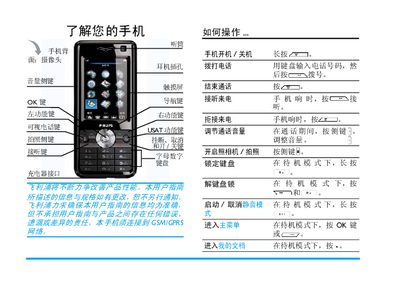
This manual explains how to use the Philips TM700 mobile phone. It covers first‑time setup, hardware installation, basic operation, multimedia features, and maintenance. Safety warnings and warranty information are also included.
Key sections include first‑use guidance, battery and USIM installation, power on/off procedures, calling and messaging functions, camera operation, entertainment apps, and detailed troubleshooting steps. This manual is written in Chinese.
| Supported Networks | TD‑SCDMA 2010‑2025 MHz and GSM 900/1800 MHz |
|---|---|
| Memory Card Capacity | Up to 2 GB (T‑Flash) |
| Battery Type | Lithium‑ion rechargeable battery |
Press and hold the power key until the phone starts and enters standby mode.
Turn off the phone, remove the battery, insert the USIM card into the slot with the correct orientation, then re‑insert the battery and power on.
Connect the supplied travel charger to a power outlet, plug the charger into the phone, and disconnect once charging is complete.