
This is a Chinese manual that introduces the functions of the phone, such as power on and off, calls, and taking pictures
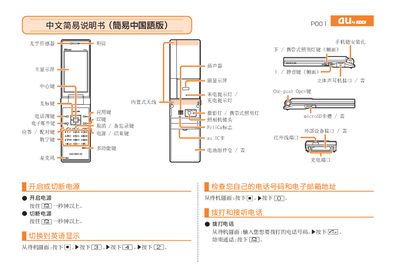
This manual provides step‑by‑step instructions for operating the au P001 handset. It describes the layout of the device, including the main display, keypad, speaker, camera lens, microSD slot, and built‑in antenna, as well as how to navigate the standby screen.
Key functions covered include making and answering calls, managing contacts, recording voice memos, taking photos and animations, and adjusting silent mode. Contact information for au customer service is also provided. This manual is written in Chinese.
From the standby screen, enter the phone number you want to dial and press the call key.
When the phone rings, press the answer key to answer the call.
Press and hold the mute key for more than one second to enable silent mode; repeat to cancel.
From the standby screen, press and hold the voice memo key for more than one second to start recording; repeat to stop.