
This manual introduces basic connections, playback and troubleshooting methods for the Philips DVP 3015K DVD player.
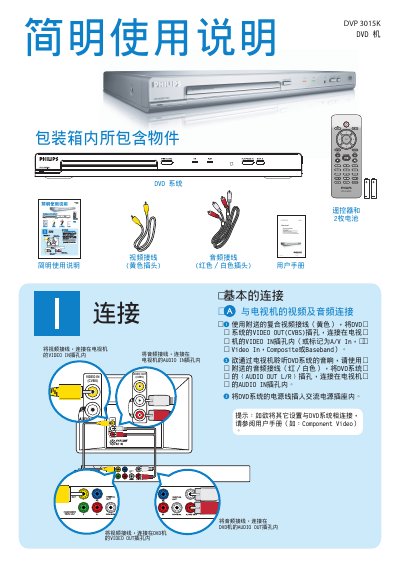
This manual describes the front‑panel controls and remote‑control functions of the DVP 3015K DVD player, including Play/Pause, Stop, Disc Menu and Setup options such as language and standby. It also lists the available audio and video connections, showing how to hook up composite video, component video, and stereo audio.
The guide provides step‑by‑step instructions for common tasks like inserting a disc, navigating the on‑screen menu, locking the disc, adjusting the display dimming, and selecting the OSD language. Troubleshooting tips and safety notices are included at the end of the document. This manual is written in Chinese.
| Video Output | CVBS |
|---|---|
| Video Input | CVBS |
| Component Video | Supported |
| Audio Output | L/R stereo |
| Audio Input | Stereo |
Press the PLAY/PAUSE button on the remote control.
Use the Disc Lock function in the Setup menu.
Select the desired language in the OSD Language setting under General Setup.