
This document is the user manual of DVP 3040K DVD player, which mainly introduces the connection, use and troubleshooting of the product.
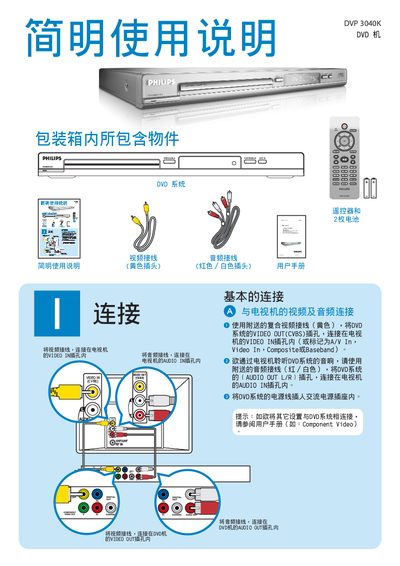
The guide explains how to connect the DVD player to a TV or other display using the VIDEO OUT (CVBS) connector and how to link audio via the AUDIO OUT L/R jack. It also covers basic remote‑control functions such as PLAY, STOP, MENU and SETUP, and describes how to navigate DVD menus and subtitles.
Additional sections cover troubleshooting tips, including checking power connections, standby mode, audio issues, and remote‑control battery replacement. A link to Philips support is provided for further assistance. This manual is written in Japanese.