
This is the user manual for DVP 3020 DVD player. It introduces the basic connections to TV and playback operations.
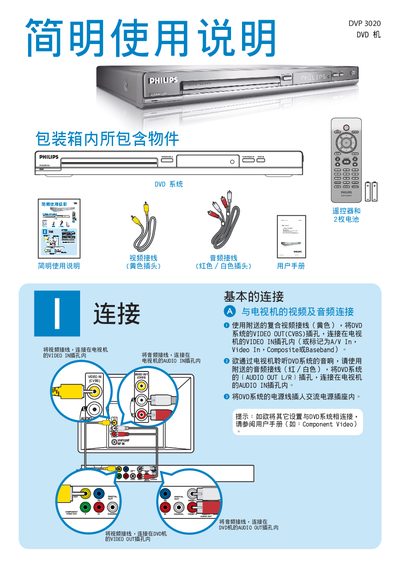
This guide explains the items included with the Philips DVP 3020 DVD player and shows how to connect the video (CVBS) and audio (L/R) outputs to a TV or audio system. It also details the use of the supplied remote control for basic functions such as play, pause, and menu navigation.\n\nAdditional sections cover troubleshooting steps for common issues like no picture, no sound, or remote‑control problems, and provide tips for proper installation and operation. This manual is written in Chinese.
| Video Output (CVBS) | Composite video |
|---|---|
| Audio Output (L/R) | Stereo audio |
Connect the DVD player's VIDEO OUT (CVBS) socket to the TV's VIDEO IN socket.
Press the PLAY/PAUSE button on the remote control to begin playback.
Press the DVD MENU button on the remote control to open the DVD menu.
Verify that the audio cables are correctly connected and the volume is set appropriately.