
This document is a concise user manual for the DVP 3026K DVD player, which introduces the use of audio and video cables, the remote control, and provides basic connection instructions and a guide for starting playback.
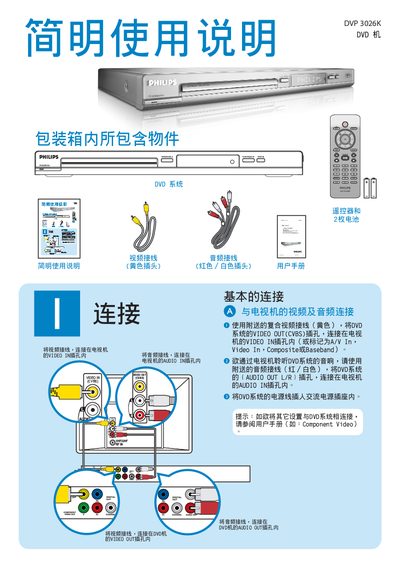
This manual lists the items included in the package and provides basic connection instructions for video and audio signals, showing how to connect the DVD player to a TV or monitor using the CVBS video output and L/R audio output. It also details the use of the supplied remote control for playback, menu navigation, and special functions.
Additional sections cover troubleshooting tips, such as checking power, standby, audio connections, and remote‑control operation, as well as guidance on accessing the DVD menu and resolving common playback issues. This manual is written in Chinese.
| Video Output | CVBS (Composite Video) |
|---|---|
| Audio Output | L/R stereo |
| Video Input | Composite or Baseband |
Press the PLAY/PAUSE button on the remote to begin playing the DVD.
Verify that the audio cables are properly connected, the volume is turned up, and the speakers are correctly set up.