
This is a user manual, mainly introducing the basic connection, start playback, language option settings and troubleshooting of DVP 4050 DVD player.
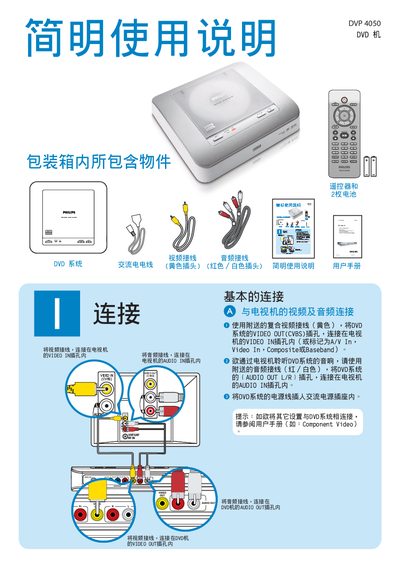
This guide explains how to connect the DVP 4050 DVD player to a TV or monitor, including video (CVBS) and audio (L/R) cable connections, and how to use the supplied remote control for basic functions such as play, pause, and menu navigation.
It also covers common troubleshooting steps, such as checking power and signal connections, resolving audio issues, and what to do if the remote control does not respond. This manual is written in Chinese.
| Video Output | CVBS |
|---|---|
| Audio Output | L/R |
Connect the DVD player's VIDEO OUT (CVBS) to the TV's VIDEO IN, and the AUDIO OUT L/R to the TV's AUDIO IN.
Insert the DVD, then press the PLAY/PAUSE button on the remote to begin playback.
Verify that the audio cables are correctly connected and that the TV’s volume is up; also check the remote’s battery.