
This quick start guide introduces the basic connection and operations of DVP 5960 DVD player.
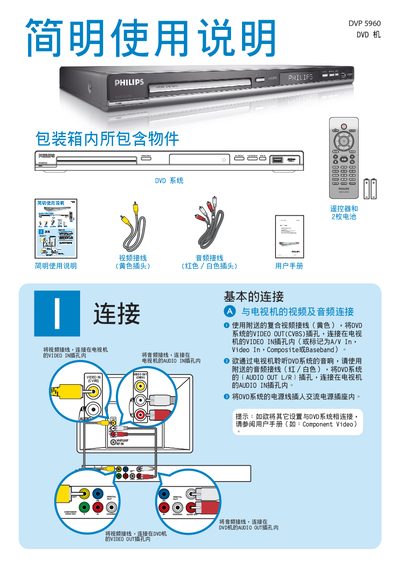
This guide explains how to connect the DVP 5960 DVD player to a TV using the supplied yellow video cable (VIDEO OUT (CVBS) to TV’s VIDEO IN) and the audio cable (AUDIO OUT L/R to TV’s AUDIO IN). It also covers basic remote‑control functions, menu navigation, and playback controls such as PLAY/PAUSE and STOP.
Additional sections describe troubleshooting steps for common issues like no picture, no sound, or remote‑control problems, and provide safety reminders and contact information for further support. This manual is written in Chinese.
| Video Output | Composite (CVBS) |
|---|---|
| Audio Output | Stereo L/R |
Connect the yellow video cable from the DVD player’s VIDEO OUT (CVBS) to the TV’s VIDEO IN, and the audio cable from the player’s AUDIO OUT L/R to the TV’s AUDIO IN.
Insert a DVD, then press the PLAY/PAUSE button on the remote to start playback and the STOP button to stop it.
Verify that the AUDIO OUT L/R cable is properly connected to the TV’s AUDIO IN and that the TV volume is set correctly.