
This is a quick start guide for the Philips SHB9001WT Bluetooth headset, which introduces the features and usage of the headset
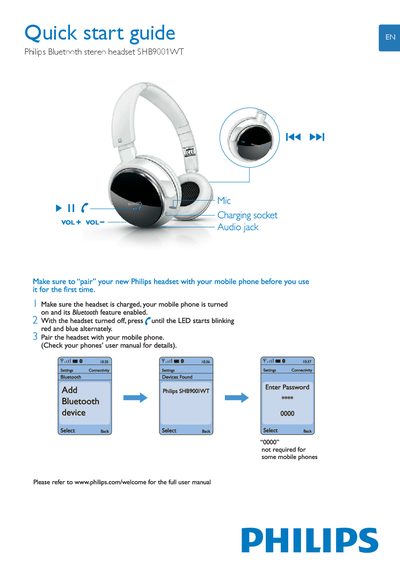
This guide shows how to pair the Philips SHB9001WT headset with a mobile phone. Ensure the headset is charged, turn it on, and press the power button until the LED blinks red and blue, then select the device on your phone.
It also explains the touch controls: tap to play/pause, double‑tap to skip tracks, hold to reject calls or activate voice dialing, and adjust volume with VOL‑/VOL+. Register the product online for full features.
| Charging socket | Present |
|---|---|
| Audio jack | Present |
| Volume control | VOL+ and VOL‑ |
Turn the headset off, press the power button until the LED blinks red and blue, then select "Philips SHB9001WT" in your phone’s Bluetooth settings.