
This manual explains how to use the Optoma ZH406ST projector, including connecting a computer/laptop, connecting to a video source, setting up the projector's image quality, display settings, initial settings and features.
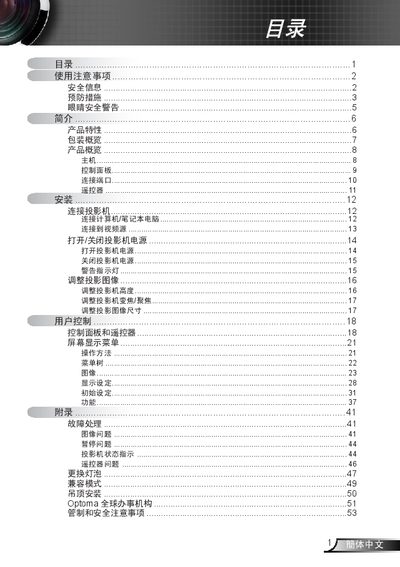
The manual begins with safety information and preventive measures, covering topics such as avoiding electric shock, keeping the projector dry, and proper ventilation. It also details installation procedures, including ceiling mounting and connection of power, VGA, and USB cables.
Subsequent sections describe how to operate the projector using the control panel and remote, adjust image size and focus, replace the lamp, and troubleshoot common issues. FCC compliance, disposal instructions, and warranty information are also included. This manual is written in Chinese.
| Supported resolutions | UXGA, SXGA+, SXGA, WXGA, SVGA, VGA |
|---|---|
| Video standards | NTSC, NTSC4.43, PAL, PAL-M, PAL-N |
| Built‑in speaker power | 1 W |
| Lamp monitoring | Auto‑detects lamp life and warns when replacement is needed |
| FCC compliance | Meets FCC Part 15 Class B requirements |
Wait for the projector to cool, then follow the replacement instructions on pages 47‑48 and use the Lamp Settings menu.
Turn off the power, use a soft cloth with neutral detergent, and avoid solvents or abrasive cleaners.
Use shielded cables for connections, keep the projector away from antennas, and plug it into a separate power outlet if needed.