
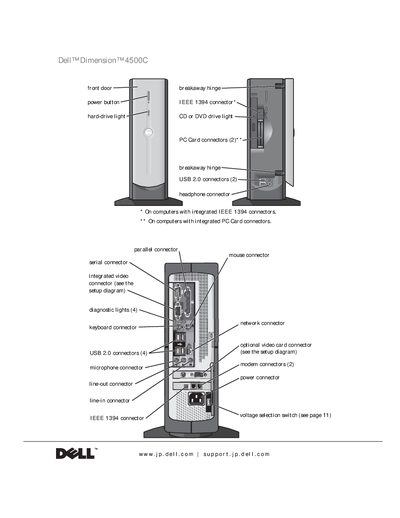
This document describes the features of the Dell Dimension 4500C desktop computer, including the front door power button, hard-drive light, CD or DVD drive light, USB 2.0 connectors, headphone connector, breakaway hinge, IEEE 1394 connector, PC Card connectors, etc.
This manual covers everything you need to get started with the Dell Dimension 4500C desktop, including safety instructions, hardware connections, and step‑by‑step setup of peripherals such as printers, USB devices, and network adapters. It also explains how to configure your Internet connection and use the built‑in utilities like Dell Diagnostics.
Later sections guide you through troubleshooting common problems, adding or replacing components like memory and video cards, and accessing technical support resources. An appendix lists the full technical specifications of the system.
See the "Connecting a USB Printer" section in the manual for step‑by‑step instructions.
The Dell Diagnostics are described on page 64 under the Diagnostics section.
Refer to the "Replacing the Battery" section on page 103 for detailed instructions.