
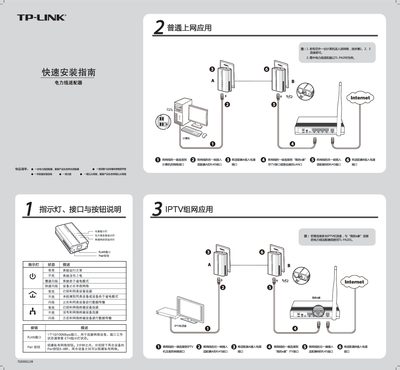
This guide explains how to set up the TL‑PA200 powerline adapter, connect it to your router and devices, and use the Pair button or the companion application to create a private network. It also describes the LED indicators, ports, and button functions.
The document provides detailed installation steps, including connecting Ethernet cables, pairing adapters, and configuring network names. A FAQ section covers transmission distance, interference, and usage requirements. This manual is written in Chinese.
| Ethernet port speed | 10/100 Mbps |
|---|---|
| Maximum transmission distance (TL‑PA200) | 300 m |
Home appliances generally have little impact, but power strips and chargers may affect performance, so keep the adapter away from them.
No, at least two adapters are required to form a network.