
This document describes how to upgrade the language package of DIR-600 router
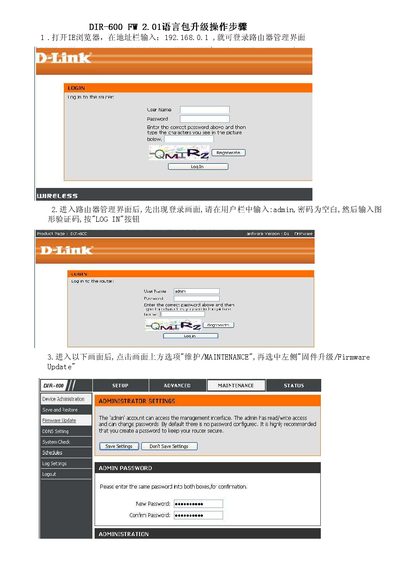
The guide shows how to log into the DIR‑600 router using the default admin account (username admin, password left blank) and access the Maintenance section of the web interface. From there, you select Firmware Update, browse to the language‑pack file, and start the upgrade.
After starting the upgrade, the router displays a progress screen and warns not to power off the device. When the process finishes, a confirmation screen appears indicating a successful language‑pack installation, which typically takes about two minutes. This manual is written in Chinese.
| Model | DIR-600 |
|---|
Enter the username admin with a blank password on the login screen, then type the characters shown in the picture.
Open the Maintenance menu, choose Firmware Update, click the Browse button to select the language‑pack file, then click Upgrade and wait for the process to finish.