
This document introduces the usage of manual 2286 1 MA0408-CkA, including features such as timer mode, database mode, calendar mode, and alarm mode.
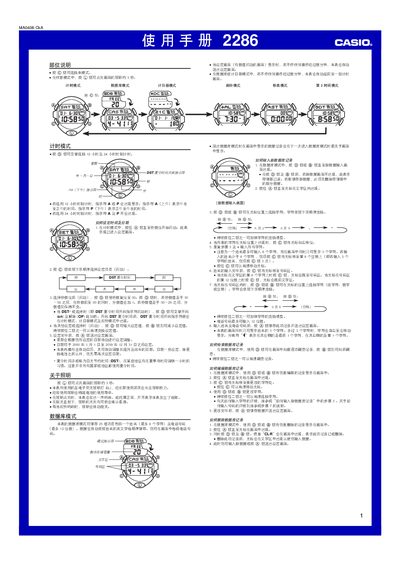
This manual explains how to operate the Casio 2286 wristwatch. It covers basic time‑setting, switching between 12‑hour and 24‑hour modes, daylight‑saving time, and using the backlight. Detailed procedures are provided for each mode, including timer, day‑counter, alarm, and stopwatch functions.
The guide also describes the watch’s data storage capabilities, such as a 25‑entry address book and five independent alarms, and explains how to edit, delete, or retrieve records. Safety notes, battery‑life tips, and troubleshooting hints are included throughout. This manual is written in Chinese.
| Date range (setting) | 2000‑01‑01 to 2039‑12‑31 |
|---|---|
| Date range (alternate mode) | 1940‑01‑01 to 2039‑12‑31 |
| Database capacity | 25 entries (name up to 8 characters, phone up to 12 digits) |
| Day‑counter records | 5 records (each with 8 characters and a target date) |
| Alarms | 5 independent alarms |
| Backlight type | Electronic fluorescent (EL) backlight |
| Hour format selection | 12‑hour or 24‑hour mode |
In time‑keeping mode, press the button until the seconds digits start flashing, then use the buttons to adjust hours, minutes and seconds. Press the button again to exit the setting screen.
The watch can store up to 25 contacts, each with a name of up to 8 characters and a phone number of up to 12 digits.
It has five independent alarms. In alarm mode, select the alarm number, then use the buttons to increase or decrease the time and confirm the setting.
When the DST indicator flashes, press the button to toggle DST on (ON) or off (OFF). The DST indicator will then appear in the time‑keeping, day‑counter and alarm modes.