
This document provides the pre-use information for using CASIO watches, including the need to expose the watch to light for charging, the power-saving function of the watch, and the manual process of setting the time and date.
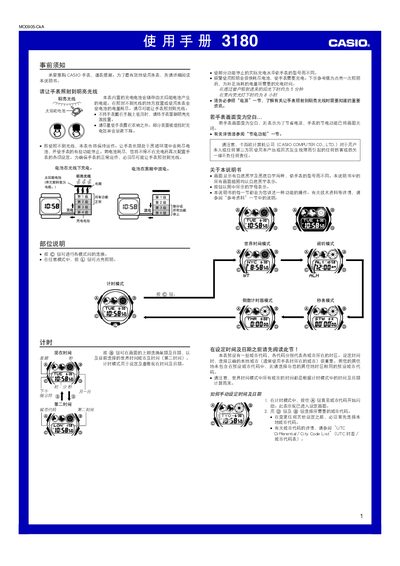
The manual details the functions of the 3180MO0905-CkA watch, such as timekeeping, world‑time selection, alarms, stopwatch, countdown timer, illumination and power‑saving modes. It provides step‑by‑step instructions for navigating between modes, adjusting settings, and using the EL backlight.
It also covers charging the built‑in solar cell, battery maintenance, and safety precautions. Proper exposure to bright light keeps the rechargeable battery topped up, while the power‑saving feature extends operation when light is unavailable. This manual is written in Chinese.
| Accuracy (room temperature) | ±15 seconds per month |
|---|---|
| Time display fields | hours, minutes, seconds, AM/PM indicator, month, day, weekday |
| Hour format | 12‑hour and 24‑hour |
| Calendar | Fully automatic from 2000 to 2099 |
| Alarms | 5 daily alarms (4 regular, 1 intermittent) |
| Stopwatch resolution | 1/100 second |
| Countdown timer resolution | 1 second |
| Backlight type | EL (electroluminescent) panel |
| Power source | Solar cell with rechargeable battery |
In any mode, hold the L button for about 3 seconds to toggle automatic illumination on or off; an indicator shows its status.
Expose the watch to bright light; the built‑in solar cell charges the internal rechargeable battery. Keep the watch uncovered for best results.