
Key facts
- Brand
- testo
- Model
- 175
- Category
- Other Electronics
- Industry
- Electronics
- Documents
- 10
- Languages
- DE · EN · ES · ZH · PT
- Last added
- 2026-11-10
Start here
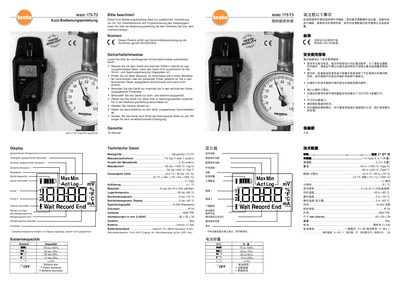
Testo 175-T3 Quick Start Guide
The Testo 175‑T3 Quick Start Guide provides concise instructions for using the handheld temperature logger. It explains the display functions, battery status indicators, alarm settings, and basic operation steps such as starting and ending a measurement program.
Safety notes, warranty information, and a technical data table are included. The guide specifies the sensor types, measurement ranges, accuracy, resolution, storage capacity, and operating temperature limits, helping users set up the device correctly and maintain it safely. This manual is written in German.
Testo 175 specifications
| testo 175 T1 measurement range | -35 to +55 °C |
|---|---|
| testo 175 T2 internal measurement range | -35 to +55 °C |
| testo 175 T2 external measurement range | -40 to +120 °C |
| testo 175 T3 measurement range (Type T) | -50 to +400 °C |
| testo 175 T3 measurement range (Type K) | -50 to +1000 °C |
| testo 175 H1 temperature range | -20 to +55 °C |
| testo 175 H1 humidity range | 0 to 100 %rF |
| Battery type | 3x AAA or Energizer L92 AAA |
| Memory capacity | 1 million measurement values |
| Measurement interval | 10 s to 24 h |
| Interface | Mini-USB, SD card slot |
| Protection class (T1, T2, T3) | IP 65 |
| Protection class (H1) | IP 54 |
| Dimensions (T1, T2, T3) | 89 x 53 x 27 mm |
| Dimensions (H1) | 149 x 53 x 27 mm |
| Housing | ABS/PC |
All Testo 175 documents by type
Day-to-day operation, settings and troubleshooting. Start here if the product is already set up.
The shortest path to a working setup, usually only a few pages.
Questions answered in these manuals
What does "Err" with a blinking red LED and "out" on the display mean?
There was an error saving data to the SD card; remove the SD card, free storage space and copy the data.
What does "nO dAtA" on the display mean?
The logger has not recorded any data yet and is in Wait mode; remove the SD card and wait until it enters Rec mode.
What software is compatible with the testo 175-H2?
The device supports Microsoft Windows 95b, 98, ME, NT4-Sp4, 2000, and XP.
From: testo 175-H2 Humidity and Temperature Logger Product Leaflet
Does the testo 175-H2 include a calibration protocol?
Yes, it comes with a calibration protocol.
From: testo 175-H2 Humidity and Temperature Logger Product Leaflet
What is the testostor 175 used for?
It measures a value (or value pair) within a fixed measurement interval and saves the measured data in the memory.
What software is needed to read and program the testostor 175?
Windows software is needed to read and program.